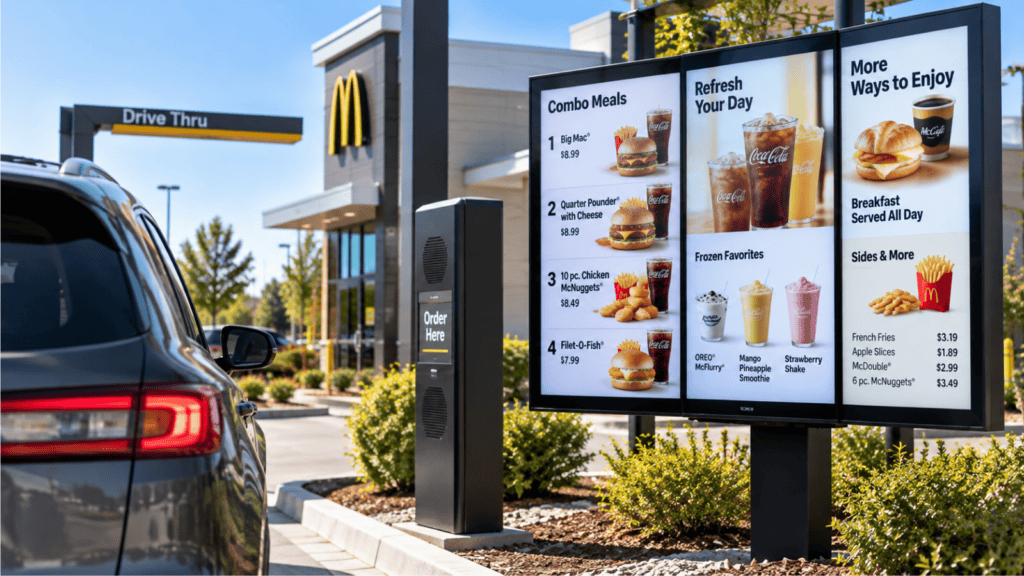
The static menu board had a good run. You printed it, you installed it, and when a price changed or a limited-time offer launched you called a sign company and waited a week. For a restaurant that ran the same menu for years, that was a manageable process.
Most QSR operators today do not run the same menu for years. Pricing changes more frequently. Daypart menus shift between breakfast, lunch, and dinner. Limited-time offers rotate on a schedule set by the franchise group. Nutritional information requirements update. And the visual standard that customers expect from a menu display has moved well past what a printed panel can deliver.
Digital menu boards are how modern QSR operations handle that complexity without the operational overhead of managing static panels across multiple locations. This guide covers how the technology works, what the installation involves, what operators should evaluate when choosing a system, and what separates a well-deployed digital menu board from one that creates more problems than it solves.
What Digital Menu Boards Are and What They Are Not
A digital menu board is a commercial-grade display — indoor or outdoor — connected to a content management system that controls what appears on screen and when. The display itself is built for commercial use: higher brightness to compete with ambient light, higher duty cycles for extended hours of operation, and ratings for the temperature ranges a restaurant environment produces.
The content management system is what makes a digital menu board operationally useful. A CMS allows an operator to update pricing across all locations from a single interface, schedule daypart content to switch automatically without manual intervention, and push limited-time offer creative at launch without coordinating with a sign vendor. For a franchise group with multiple locations, a CMS is what makes digital menu boards a management tool rather than just a display upgrade.
What a digital menu board is not is a consumer television mounted on a wall. Consumer displays are built for home use — 8 to 12 hours of daily operation, standard ambient lighting, and temperatures that stay within a normal indoor range. A consumer television installed in a drive-thru order point or a kitchen-facing position will overheat, lose brightness, and fail well before a commercial panel in the same position. The cost savings of using consumer displays in a commercial environment are recovered by the replacement vendor within a year.
Indoor vs Outdoor: What the Difference Actually Means
The display specification that matters most for drive-thru menu boards is brightness, measured in nits. An indoor display in a well-lit lobby needs 400 to 700 nits to be readable. A drive-thru display competing with direct Georgia summer sunlight needs 2,500 nits or more to be readable to a driver approaching the order point. A standard commercial display installed in an outdoor drive-thru position is often unreadable during peak daylight hours. A customer who cannot read the menu before they reach the speaker post takes longer to order.
Outdoor displays also need to handle temperature extremes. A drive-thru menu board in South Carolina or Ohio needs to perform at temperatures that vary from well below freezing in winter to well above 90 degrees in summer. Displays rated for outdoor commercial use are specified for that range. Displays that are not will fail in ways that look like electrical problems but are actually thermal management failures.
Indoor configurations are generally more straightforward: the display is mounted in a controlled environment, brightness requirements are lower, and temperature range is narrow. The variables that matter most for indoor installations are mounting configuration, viewing angle, and CMS integration rather than weather rating.
How the Content Management System Works
The CMS is where the operational value of digital menu boards lives. A display without a CMS is a very expensive static board. A display with a properly configured CMS is a management tool.
At the most basic level, a CMS allows you to update what is showing on the board from a connected device. You change a price in the system and it updates at every location simultaneously. You schedule breakfast menu content to display from 6 AM to 10:30 AM and lunch content to switch on automatically — no manual board changes, no crew involved.
At a more sophisticated level, a CMS can manage content across a large portfolio of locations from a single interface, push location-specific content where regional pricing or menu differences apply, and integrate with POS data to suppress items that are out of stock. For a franchise group running a dozen locations, that level of control eliminates a significant amount of coordination overhead.
CGS is a Mood Media franchise partner. The Mood Media digital signage CMS is the platform CGS installs and supports directly. Beyond that, CGS has worked in restaurants running the full range of menu board and signage systems, so we are familiar with the hardware operators already have in the field and fit into your existing setup rather than forcing a replacement.
What the Installation Actually Involves
Most operators underestimate the infrastructure side of a digital menu board installation. The display is the visible component. Getting it operational requires electrical infrastructure, mounting hardware, cabling, CMS configuration, and — for drive-thru boards — weather-rated enclosures and conduit.
For an indoor installation in a location that has not previously had digital boards, the installation typically involves electrical work to bring appropriate power to the mounting location, low-voltage cabling for data and control signals, mounting hardware engineered for the display weight and wall type, and CMS setup and content loading before the board goes live.
For a drive-thru installation, the infrastructure requirements are more substantial. Outdoor displays require conduit-protected cabling runs from the building to the order point, electrical supply rated for outdoor use, mounting structures that position the display at the correct height and angle for a driver approaching in a vehicle, and commissioning that confirms the display is readable under the daylight conditions specific to that location's orientation.
What Operators Should Evaluate When Choosing a System
- Commercial grade vs consumer grade. Ask specifically whether the display is commercial grade or consumer grade, what the nit rating is for drive-thru boards, and what the duty cycle rating is.
- CMS capability for your actual needs. A CMS that handles single-location content updates is not the same as one that handles multi-location portfolio management with location-specific variations.
- Drive-thru integration. A digital menu board at the order point that is not integrated with the drive-thru communication system and timer misses an opportunity. Ask what integration the system supports before installation.
- Who handles content after installation. Confirm what the ongoing content support model looks like before installation.
- Single-source accountability. A display vendor who installs the boards and leaves the CMS setup to another vendor splits accountability at the point where problems are most likely to occur.
How CGS Approaches Digital Menu Board Installations
CGS installs commercial-grade digital menu board systems for QSR operators across Georgia, South Carolina, and Ohio. Indoor and outdoor configurations, drive-thru displays rated for direct sunlight and temperature extremes, CMS setup and training, and multi-location content management for franchise groups.
We handle the full installation — cabling, mounting, electrical coordination, CMS configuration, and content loading — so there is one partner accountable for the full result. For multi-unit operators, we build the same configuration at every location so content management is consistent and troubleshooting is predictable.
If you are evaluating a digital menu board installation or replacement, contact us for a site assessment. We will tell you what your location requires, what it will cost, and what the operational result looks like before any work begins.
Evaluating Digital Menu Boards for Your Restaurant? Start With a Free Assessment.
CGS installs commercial-grade digital menu board systems for QSR operators and restaurants across Georgia, South Carolina, and Ohio. We are a Mood Media franchise partner handling indoor and outdoor configurations, drive-thru displays, CMS setup and training, and multi-location content management. One partner, full installation, single point of accountability. Call or text 1-800-277-9444 or visit cgsvideo.com.
Get a Free Site Assessment
About the Author
Written by Grant Wycliff, President of CGS. Grant works with QSR operators and restaurant owners across Georgia, South Carolina, and Ohio on digital menu board installations, commercial AV, and full-stack technology integration. CGS is a Mood Media franchise partner installing and supporting commercial-grade digital menu boards for restaurants and QSR operators across the region. Connect with us on LinkedIn.